 Website Roast
Chrome extension · MV3
Your website deserves this.
Click once. Get an audit of the page you're on — with the criticism written by something that actually read it, and a fix attached to every line.
Free. No account. No server. activeTab,
scripting, storage — and no host
permissions at all.
"Your call to action could be more prominent."
"Your CTA is the same grey as your footer links. Give it your brand colour and put it above the fold."
Half of it isn't an opinion.
Most AI audit tools ask a language model to score your accessibility. A model cannot measure contrast, and it will happily invent a number. So this doesn't ask it to.
Measured
Pure functions, on your device
- Accessibility
- SEO
- Performance
- Conversion
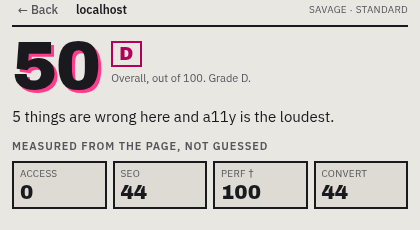
70% of the overall score. Same page, same findings, every time — which is the only reason "what changed since last time" can be trusted.
Opinion
A language model, labelled as such
- Copywriting
- Branding
- Originality
- Modern feel
- Emotional appeal
30% of the overall score. It writes the review and scores these five. It is not allowed to contradict the measurements, and it can move the number without controlling it.
And every criticism has to cite something. A finding id that exists, or a string that appears verbatim on your page. Anything the model writes that it cannot anchor is deleted before you see it — which also means it structurally cannot make an unfalsifiable remark about you.
Point at the thing.
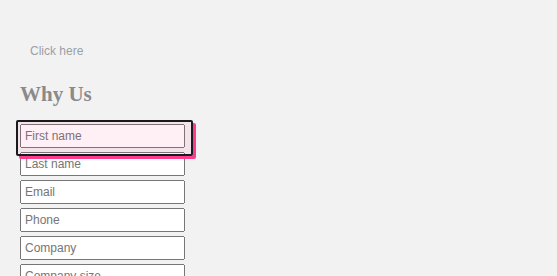
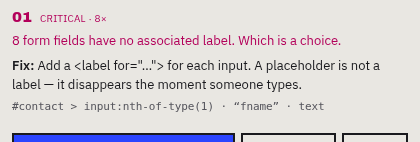
A finding you can't locate is trivia. Every finding that has an element carries its selector, and clicking it outlines that element on the live page — including inside shadow roots.
What it does.
Nine scores, four voices, and a few things built because the alternative was shipping a placeholder.
Four personalities
Savage has seen ten thousand of these. Investor reads it in forty seconds and asks what you sell. Designer sees the 3px misalignment first. Support reads it as the person answering the emails it causes.
Intensity, not severity
Gentle, Standard and Savage change the jokes and never the findings. The audit is identical at all three — the dial is humour, not harshness.
It knows when not to be funny
Memorial pages, medical and crisis resources, charity appeals, government services and personal sites switch to Positive Mode automatically — and it tells you why it switched.
Diff mode
Roast a page you've roasted before and see what moved: what you fixed, what's new, and how the measured scores changed. Only possible because those four are reproducible.
Share cards
1:1 and 9:16, drawn to canvas at 2× and legible at thumbnail size. Download it, copy the image, copy the text, or open a pre-filled post.
Copy the whole audit
As Markdown, into an issue tracker, with the measured/opinion split intact for whoever reads it there. CSV and JSON export too, for running this across a set of pages.
What leaves your device.
Stated per provider, and shown in the interface next to the choice rather than buried in a policy. There is no server in the middle, because there is no company behind this.
| Model | Does page content leave your device? | Cost |
|---|---|---|
| Chrome built-in (default) | No — the model runs on your machine | Free |
| Your own API key | Yes — to Anthropic, OpenAI or Google, on your account, with your key | Your bill, estimated before you spend |
| Hosted | Not built. There is no backend. | — |
Before anything is sent anywhere — or written to your own disk — email addresses, phone numbers, card-shaped numbers, API keys and tokens are stripped out of the extracted page. Form values are never read at all, only whether fields have labels.
No analytics. No telemetry. No crash reporting. The only outbound request the extension can make is the one you configured, to the vendor you chose. Read the full privacy policy →
Install it.
Not on the Chrome Web Store yet. Until it is, load it unpacked — it takes a minute.
Clone the repository and build it.
git clone https://github.com/AdityaRungta2048/RoastMySite
cd RoastMySite
npm install
npm run build
Open chrome://extensions and turn on
Developer mode, top right.
Choose Load unpacked and select the dist/ folder.
Open any website and click the toolbar icon — or press Ctrl+Shift+R (Cmd+Shift+R on a Mac).
Requires Chrome 128+. The default on-device model needs Chrome 138+ and hardware that can run Gemini Nano — roughly 22GB free disk, 16GB RAM, 4GB VRAM. If yours can't, the extension says so and points you at the API-key path instead of failing quietly.